What Happens When a Game Leaves Xbox Game Pass?
When a game leaves Xbox Game Pass, subscribers lose access to it through the Game Pass library unless they buy the game separately. Microsoft usually lists departing games in the service ahead of time and offers members a discount on selected titles,…
Click any section to jump directly to that part of the article.
When a game leaves Xbox Game Pass, subscribers lose access to it through the Game Pass library unless they buy the game separately. Microsoft usually lists departing games in the service ahead of time and offers members a discount on selected titles, so players can finish a game or purchase it before it disappears.
This sounds simple, but the distinction between access and ownership is easy to miss. Playing a game through Game Pass does not mean you own a permanent copy of that game, and the rules become especially relevant when a title you have been playing suddenly appears under the service’s “Leaving soon” section.
Game Pass Is a Library, Not a Permanent Collection
The easiest way to understand Game Pass is to think of it as a subscription library.
You pay for access to a rotating catalog. As long as your subscription and the game’s availability line up, you can download or stream supported titles without purchasing each one individually. But the publisher can eventually remove a game from the catalog.
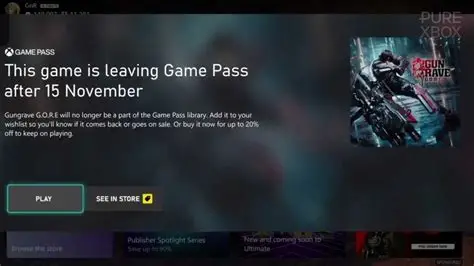
Microsoft’s own Game Pass page makes this distinction clear. Games marked as leaving the library are available for a limited time, and Microsoft directs subscribers to purchase them if they want to keep playing after they leave.
That model is different from buying a digital game outright.
If you purchase a game from the Xbox Store, removing it from Game Pass does not remove your purchased copy. The Game Pass license and the purchase license are separate things.
That distinction is one of the most important things to understand before building a large backlog around a subscription service.
What Happens on the Day a Game Leaves?
Once a game is removed from Game Pass, you can no longer launch it through your subscription unless you own it separately.
If the game was installed on your Xbox or PC, the installation does not turn into a permanent purchase. Having the files on your storage drive is not the same as having a license to play them.
In practical terms, the game can remain installed while access is restricted, depending on the platform and title. You may then need to purchase it to continue playing.
This is why the “Leaving soon” notice matters.
Microsoft gives subscribers advance warning so they have an opportunity to finish the game or decide whether it is worth buying. The official Game Pass catalog currently has a dedicated “Leaving soon” section for this purpose.
Do You Lose Your Save Data?
No, leaving Game Pass does not mean your progress is automatically erased.
Your save data is separate from your Game Pass subscription. If you later purchase the game and continue using the same account and compatible save system, your previous progress can generally be used again.
The exact behavior can depend on the game, platform and how the save is stored, so it is better not to assume that every title handles saves identically.
For Xbox Play Anywhere titles and games that support cloud saves, the transition can be particularly straightforward because the same account can carry progress between supported devices.
The important point is that the subscription ending access to a game is not the same thing as deleting your personal save file.
Can You Buy a Game Before It Leaves?
Yes, and this is where the Game Pass member discount becomes useful.
Microsoft regularly offers subscribers discounts on games that are leaving the service. The Xbox Game Pass catalog states that players can buy departing games and save up to 20% with the member discount.
Microsoft has also used this system in its official Game Pass announcements for years. In one update, the company specifically told subscribers to use their membership discount to save up to 20% on games before they left the library.
That creates a useful middle ground.
You do not have to buy every Game Pass game you enjoy. You can wait, play it through the subscription and only purchase it if the game earns a permanent place in your library.
For people with large backlogs, that can save a significant amount of money.
What Happens to Downloaded Games?
A common misconception is that downloading a Game Pass game means you have effectively purchased it.
You have not.
The download gives you the game files needed to play through the subscription. Your account still needs an active license to launch the game.
Think of it like borrowing a physical game from a library. Taking the disc home does not make the disc yours. You simply have permission to use it under the library’s rules.
Digital subscriptions work differently at the technical level, but the basic idea is similar.
This is why filling your storage with dozens of Game Pass games does not protect you from removals. The files can be sitting on your drive while your access disappears.
What About Games You Bought at a Discount?
This is where things become much easier.
If you purchase a Game Pass title before it leaves, you own the purchased license even after the game is removed from the subscription catalog.
The discount does not create a temporary license. It is a purchase.
That means a player who has been using Game Pass to test a game can effectively turn that temporary access into permanent ownership by buying the title.
Microsoft’s system is designed around exactly this transition. The service introduces players to games, while discounts give them a reason to purchase the ones they want to keep.
Why Does Microsoft Remove Games?
Game Pass is built around agreements between Microsoft and game publishers, so not every title can remain in the library indefinitely.
Licensing arrangements can affect how long a game stays available. A publisher may also choose not to renew an agreement, or the terms of the original deal may simply expire.
This is why Game Pass removals are normal rather than evidence that something has gone wrong with the service.
Microsoft’s official Game Pass announcements routinely include both additions and departures. In June 2026, for example, Xbox announced that Jurassic World Evolution 2, Lost in Random: The Eternal Die, Scott Pilgrim vs. The World, Warhammer 40,000: Space Marine, and Teenage Mutant Ninja Turtles: Shredder’s Revenge would leave the library on June 15.
That rotation is part of how the subscription works.
Four Games Are Leaving in August 2026
The current August 2026 schedule gives subscribers a useful example of how the system works in practice.
Four games are scheduled to leave Game Pass on August 15: Atlas Fallen: Reign of Sand, MENACE, Aliens: Fireteam Elite and Firewatch.
| Game | Leaving | Platforms Listed |
|---|---|---|
| Atlas Fallen: Reign of Sand | August 15, 2026 | Console, PC, Cloud |
| MENACE | August 15, 2026 | PC |
| Aliens: Fireteam Elite | August 15, 2026 | Console, PC, Cloud |
| Firewatch | August 15, 2026 | Console, PC, Cloud |
Xbox’s announcement also points subscribers toward purchasing the departing games with their membership discount before the removal date.
For someone who has been putting off Firewatch for years, that deadline suddenly makes the decision a little more urgent.
Should You Rush to Finish a Game?
Not necessarily.
A removal date can create artificial pressure, and that is not always useful. If you have only played two hours of a 40-hour RPG, trying to force yourself through the rest simply because the subscription deadline is approaching can turn something enjoyable into a chore.
The better question is whether the game is worth buying.
If you are halfway through a game and genuinely enjoying it, purchasing it at the member discount may make more sense than rushing to the ending. You keep your progress and remove the deadline.
If you barely started it and are not enjoying yourself, there is no reason to treat the removal date like a personal emergency.
Your backlog is already long enough.
Is Game Pass Still Worth It if Games Leave?
Yes, but the answer depends on how you use the subscription.
If you expect Game Pass to function like a permanent ownership library, the rotating catalog can be frustrating. If you understand it as a way to access a large selection of games for as long as they remain available, the model makes much more sense.
There is also a financial advantage for players who like trying games before buying them.
You can start a game without paying its full retail price, decide whether you actually like it and then purchase it later if it becomes something you want to keep.
That is especially useful for unfamiliar games.
A $60 or $70 purchase can feel like a gamble. A subscription library gives you a chance to test the idea first.
The Bigger Problem Is Backlog Psychology
Game Pass creates a strange psychological effect.
When hundreds of games are available, every individual game can feel less valuable because there is always another option waiting.
You start one game, notice another title has just been added, switch to that one and eventually receive a notification that the first game is leaving.
Suddenly you are trying to finish something you chose months ago simply because a deadline appeared.
This is not unique to Game Pass. Streaming services have created the same problem with movies and television shows. A huge catalog sounds like unlimited choice, but unlimited choice can make it harder to decide what deserves your time.
Game Pass solves the cost problem better than it solves the attention problem.
What Game Pass Is Actually Selling
The most interesting part of Game Pass is not the number of games in the catalog.
It is the reduction in risk.
You can try something you would never purchase at full price. You can experiment with a genre you normally ignore. You can download an indie game because the description sounds strange and discover that it is exactly what you wanted.
That behavior can benefit smaller games in particular.
A player may ignore a $20 indie title on a crowded storefront but happily spend an evening with it when it appears inside a subscription they already pay for.
The downside is that those players may also move on quickly.
For developers and publishers, being included in Game Pass can provide exposure, but the long-term effect depends on what players do after trying the game. Some buy it. Some recommend it. Others finish it and move on.
That tension is one of the most interesting parts of the subscription model.
What You Should Do When a Game Is Leaving
If a Game Pass game you like is approaching its removal date, there are three sensible options.
- Finish it. If you are close to the ending and still enjoying it, prioritize it before the removal date.
- Buy it. If you want to keep playing, check the Game Pass member discount before the game leaves.
- Move on. If you are not enjoying the game enough to finish or purchase it, let it go and play something else.
The worst option is probably forcing yourself through a game you no longer enjoy just because the service has placed a deadline in front of you.
Games are supposed to be entertainment. Your subscription should give you more choices, not create homework.
What About Cloud Gaming?
Cloud gaming does not change the basic ownership rule.
If a game leaves the Game Pass library, you cannot continue streaming it through Game Pass simply because you previously played it in the cloud.
The game still needs to be available through the service or owned through a supported purchase and streaming arrangement.
This distinction is becoming more relevant as Xbox expands cloud gaming and makes Game Pass accessible across more devices. Microsoft separates the games available through the subscription catalog from games that players own and can stream through supported services.
In other words, cloud access is still access.
It does not automatically turn a subscription game into something you own.
Game Pass Is Better When You Understand the Rules
The easiest way to avoid frustration is to treat Game Pass like a rotating library from the beginning.
Play what interests you. Do not assume a game will remain forever. Watch the “Leaving soon” section if there is something you particularly want to finish, and use the member discount if a title earns a permanent spot in your collection.
Microsoft has built those tools directly into the service. The Game Pass catalog identifies games approaching removal and tells subscribers they can buy them with a discount to keep playing.
That makes the system fairly transparent once you understand what the subscription actually provides.
Game Pass is not selling ownership.
It is selling access, discovery and convenience.
That distinction explains almost everything about the way its library changes. Games come in, games leave, and the player decides which ones are worth keeping.
Frequently Asked Questions
What happens when a game leaves Xbox Game Pass?
You lose access to the game through your Game Pass subscription once it leaves the library. To continue playing, you need to purchase the game or access it through another valid license.
Do you keep Game Pass games forever?
No. Downloading or playing a game through Game Pass does not give you permanent ownership. Games can leave the subscription catalog, at which point you need to purchase them if you want to keep playing.
Do Game Pass games disappear from your Xbox when they leave?
Game files installed through Game Pass do not become permanent purchases when a title leaves. The important change is the license that allows you to play the game through the subscription.
Can I buy a Game Pass game after it leaves?
In most cases, a game that leaves Game Pass can still be purchased separately if it remains commercially available. Availability can vary by title and store.
Do you get a discount when a Game Pass game leaves?
Microsoft offers Game Pass members discounts on games that are leaving the service, with its Game Pass catalog stating that eligible departing games can be purchased with savings of up to 20%.
Do I lose my save if a Game Pass game leaves?
Leaving Game Pass does not automatically mean your save data is deleted. If you later purchase the game and use the same compatible account and save system, you can generally continue from your existing progress.
What games are leaving Xbox Game Pass in August 2026?
The games currently confirmed to leave on August 15, 2026 are Atlas Fallen: Reign of Sand, MENACE, Aliens: Fireteam Elite and Firewatch.
You might also like: Games in the World
Sources
- Games in the Worldwww.gamesintheworld.com